Real Plans - Meal Planner
- 4.4
- Rating
- 50.00K
- Installs
- Free
- Price

 Analysis by App-foxy
Planning healthy home cooking sounds simple until I am standing in the kitchen after a long day, trying to decide what to make, whether I have the ingredients, and how much work the recipe will create. Real Plans - Meal Planner is designed to reduce that daily guesswork by bringing meal planning into one place. I found its main appeal less in flashy presentation and more in the way it encourages a repeatable cooking routine.
This is a free Food & Drink app from Real Plans Inc., available to users rated Everyone. It has built a modest but meaningful audience, with over 50 thousand installs, an average rating of 4.4 from around 479 ratings, and roughly 181 written reviews. Those figures suggest an app that has earned steady interest rather than simply appearing briefly in the store.
My recommendation is aimed at someone who wants to cook at home more consistently but does not want to build a weekly menu from scratch. It can also help households where one person usually carries the mental load of deciding meals. At the same time, it is not automatically the best fit for someone who prefers spontaneous cooking, already has a carefully organized recipe system, or wants a completely open-ended recipe search.
You May Also Like

 Pandora - Music & Podcasts
Pandora’s Music Is Easy to Start, but Harder to Recover
Pandora’s strength is its low-effort path from a seed to a station. Its weak spot is how much confidence it asks you to place in connection, setup, and quiet recovery.

 8 Ball Pool
 Is Built on Rivalries, Rematches, and Routine
A close look at the rivalries, rematches, shared routines, and unanswered safety questions that turn a quick pool match into a persistent mobile community.

 Samsung Music
’s Quiet Strength Is Playing What You Already Own
Its reach comes less from spectacle than from dependable access to a personal library. That simplicity is both the app’s strongest retention engine and its ceiling.

 AccuWeather: Weather Radar
AccuWeather Review: A Quick, Clear Forecast for Everyday Decisions
For everyday plans, the best forecast is the one you can understand quickly. AccuWeather makes rain timing, radar, and local conditions easy to act on, with a few trade-offs.

 Hill Climb Racing
Why Hill Climb Racing Still Turns Crashes Into One More Run
A tiny car, a bumpy hill and one more upgrade: Hill Climb Racing keeps resurfacing because its simple chaos makes every near-miss feel personal.

 AliExpress - Shopping App
AliExpress Makes Global Shopping Feel Personal, but Shoppers Bear the Risk
AliExpress turns a global marketplace into a pocket-sized discovery engine. Its reach is useful, its shopping loop compelling, and its trade-offs easy to miss.
More From Our News Desk
View All News


What to expect when you begin
The first thing to understand is that this is a planning tool, not merely a digital cookbook. The useful result is not just finding one appealing dish; it is turning several meal ideas into a manageable plan that can guide shopping and cooking over several days. That difference matters because many recipe apps are enjoyable to browse but leave the hardest decision to the user: what should actually happen this week?
I approached the app with a practical goal: create a plan that would make a normal weekday easier. Instead of treating every meal as a separate project, I looked for a sequence that could fit around work, errands, and changing energy levels. That is where the concept makes sense. A good plan should include meals I genuinely want to eat, while also preventing the familiar problem of buying ingredients with no clear use for them.
The app’s store summary focuses on healthy, home-cooked food, and that description matches the overall purpose I experienced. It is best viewed as a structure for making better choices consistently, rather than as a strict diet coach or a replacement for personal judgement. If your definition of healthy eating depends on medical advice, allergies, or a specific nutritional target, you should still check every recipe and ingredient decision yourself.
There is also a useful psychological advantage. Once a plan exists, cooking feels less like a series of decisions and more like a scheduled task. That may sound minor, but decision fatigue is often what turns a planned home-cooked meal into takeaway food. I found the app most valuable on ordinary days, not on weekends when I already have plenty of time to browse recipes.
Setting up a plan without overthinking it
For a first session, I would avoid trying to design the perfect week. Start with the meals you are most likely to prepare successfully. A plan filled with ambitious recipes can look impressive and still fail by Wednesday. I prefer beginning with a small set of realistic choices, then learning how well they fit my schedule before making the plan more ambitious.
Think about your week in terms of effort, not just taste. A meal that sounds appealing may be a poor choice on a night when you arrive home late. Conversely, a recipe that seems ordinary can be extremely useful if it produces a dependable dinner with little stress. This way of evaluating the app is important because the planner is only as effective as the decisions placed inside it.
Another practical step is to check your kitchen before committing to a shopping list. Pantry staples can change the cost and effort of a recipe, while missing one basic ingredient can create an unnecessary extra trip. I would use the app alongside a quick cupboard check rather than assuming the plan itself knows what is already available at home.
Families should also agree on expectations early. A meal plan is easier to follow when everyone understands whether it is a firm schedule or simply a set of suggestions. If one person dislikes several planned meals, the issue is not necessarily the app; it may be that the plan was created for one eater instead of the whole household.
The first meaningful success
The first real test is not installing the app or browsing its options. It is completing one planned meal on a busy day and feeling that the planning helped. I suggest choosing a dinner for the next evening, checking the ingredients while you still have energy, and making any substitutions before the day becomes hectic.
This workflow exposes the app’s practical value quickly. If the meal is already chosen, the ingredient situation is clear, and the preparation feels realistic, the next evening begins with less friction. I would then note what went wrong or right: Was the meal too time-consuming? Did the household enjoy it? Was there enough food for another serving? Those observations can improve the next plan more than simply adding more recipes.
A particularly useful habit is to place easier meals around demanding ones. For example, after a day when cooking is likely to be tiring, choose something familiar rather than scheduling the most elaborate option. Save variety for days when you have the time and attention to enjoy it. This is a small planning technique, but it prevents the common mistake of making every day look equally manageable on paper.
I also recommend planning around leftovers deliberately. If a recipe creates more food than one meal needs, treat that as part of the schedule rather than an accident. A planned leftover can become lunch or reduce the work required the following evening. The trade-off is that repeated food may feel less exciting, so this approach works best when convenience matters more than constant novelty.
Where first-time users may hesitate
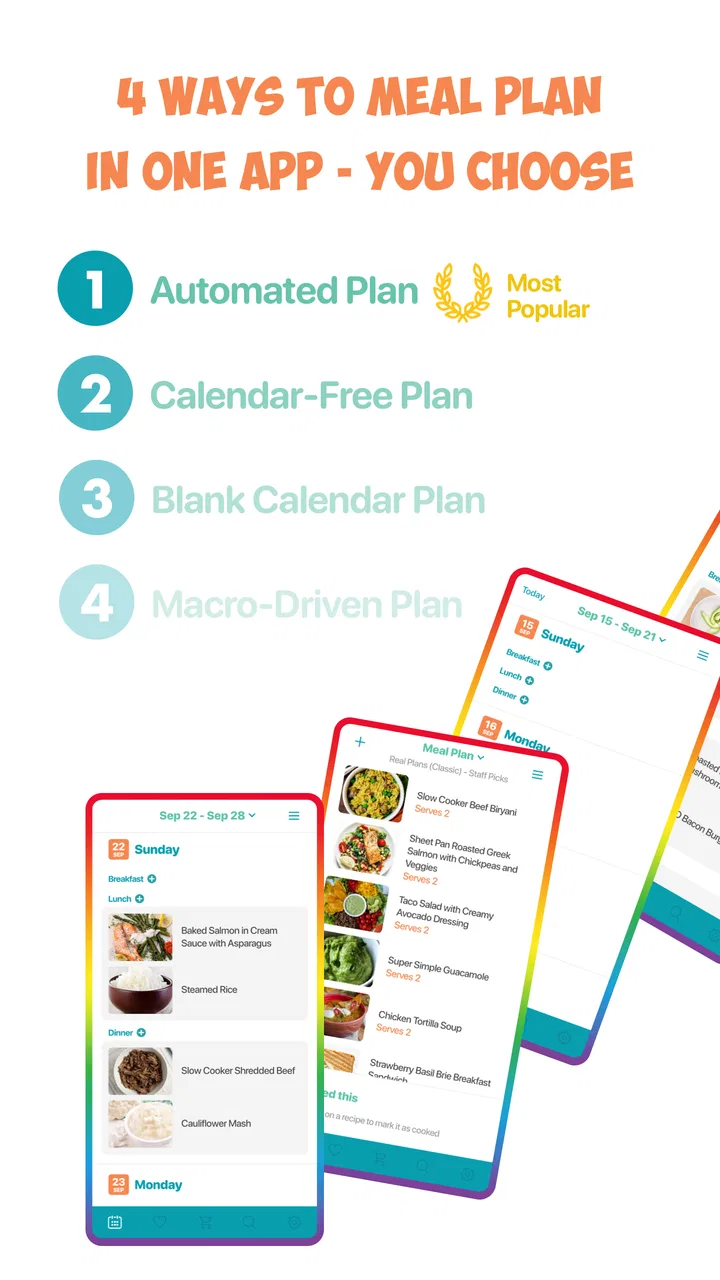
The biggest potential confusion is understanding how much control to give the planner. Some people expect a meal-planning app to make every decision automatically, while others want to control every dish, day, and ingredient. Real Plans sits more comfortably between those extremes. It is useful when you want guidance and organization, but you should still expect to make choices that reflect your household and schedule.
That means a suggested plan should not be treated as a command. If a recipe does not suit your available time, replace the idea with something more practical. If an ingredient is expensive or difficult to find locally, adjust before shopping. The best result comes from using the plan as a flexible framework, not as a rigid promise.
Another point worth clarifying is the difference between a recipe being healthy in general and being right for you personally. Dietary needs vary widely. Someone managing an allergy, intolerance, or medically prescribed diet must inspect ingredients carefully and make informed substitutions. The app can organize your choices, but it should not be the sole authority for personal health decisions.
Users may also wonder whether the free download means every part of the experience is permanently free. The app is free to install, while in-app purchases range from $0.99 to $144.99 per item. I would therefore explore the free experience first and decide whether the planning workflow genuinely fits my routine before spending money. This is especially sensible for casual users who only need occasional meal ideas.
The current version is 9.19.0, and the app requires Android 7.0 or later. That makes checking device compatibility a sensible step before planning around it. I would also keep expectations realistic across devices: an app can be useful in concept while still feeling less comfortable on an older phone or a smaller screen, particularly when reviewing several meals and ingredients.
How it compares with ordinary alternatives
The most common alternative is a handwritten list or a note on the phone. That approach is fast and completely flexible, but it depends on remembering recipes, quantities, and the reason each ingredient was purchased. Real Plans offers more structure, which is valuable when the problem is not lack of cooking knowledge but lack of organization.
Recipe websites are another familiar option. They provide enormous variety, yet browsing can become its own form of procrastination. I can spend more time saving possibilities than choosing dinner. A dedicated planner is better when I want to move from inspiration to an actual sequence of meals. The trade-off is that a focused planning app may feel less satisfying to someone who enjoys discovering something new every night.
Generic calendar apps can schedule meals, but they do not naturally connect the food decision with the cooking task. A spreadsheet can be customized more deeply, though it requires more setup and maintenance. For me, Real Plans occupies a useful middle ground: more purposeful than a blank note, less demanding than building a personal food-management system from scratch.
It is not the right choice for everyone. If you already have a family recipe binder, a reliable shopping routine, and no trouble deciding meals, adding another system may create unnecessary work. It may also disappoint users searching primarily for restaurant discovery, calorie tracking, or highly specialized athletic nutrition. Its strength is the bridge between choosing home-cooked meals and making them part of a repeatable week.
A realistic weeknight workflow
Imagine arriving home on Tuesday with limited time and no desire to make another decision. The useful preparation happened earlier: you selected the meal, checked the ingredients, and placed it in a realistic position in the week. Now the app’s value is not that it cooks for you; it removes the negotiation that usually happens at the refrigerator.
If an ingredient is missing, I would not abandon the entire plan immediately. First, decide whether a sensible substitution is available. If not, move that meal to a later day and use an easier option. This is one of the most important habits for avoiding planner guilt. A plan should absorb real life, including late meetings, unexpected errands, and changing appetites.
For households, I would make the plan visible and discuss it before the shopping trip. Let each person identify one meal they are willing to eat and one meal they would rather change. That small conversation can reduce waste and make shared responsibility clearer. It also prevents the app from becoming a private list that everyone else ignores.
For a single cook, the strongest workflow may be batching decisions rather than batching all cooking. Spend a short session choosing meals, then let the week unfold without repeated browsing. You can still cook fresh food each day, but the mental work has already been handled. This distinction is valuable for people who enjoy cooking but dislike deciding what to cook.
Making the next plan more useful
After the first successful meal, resist the urge to add too much complexity. Review the plan like a practical experiment. Which meals were genuinely convenient? Which ingredients remained unused? Did the order of meals match your energy levels? These answers help you build a plan that reflects your life rather than an idealized version of it.
I would also keep a personal shortlist of dependable meals outside the app, even while using it as the main planner. That is not a criticism; it is a sensible backup. When illness, travel, or a particularly busy week disrupts the schedule, a few familiar meals can keep the routine alive without requiring fresh research.
Another trade-off is variety. Planning too little can lead to repetitive food, but planning too much can make shopping and preparation harder. I prefer a balanced week with a few reliable meals and only one or two experiments. That gives the app enough room to support discovery without turning every dinner into a test.
Because the app is maintained by Real Plans Inc., I would treat updates as part of the normal experience and revisit the workflow when the version changes. The important question is not whether every update adds something I personally need; it is whether the app continues to make meal decisions easier. A planning tool earns its place by reducing work over time.
In-app purchases deserve a measured approach here. The wide range, from less than a dollar to well over a hundred dollars per item, means the potential commitment can vary considerably. I would not pay simply because I like the idea of organized meals. I would first complete a full planning cycle, confirm that the routine saves effort, and then consider whether any paid option addresses a problem I actually have.
My recommendation after using it
Real Plans - Meal Planner is most convincing when I use it as a practical bridge between good intentions and a real dinner. It does not remove shopping, chopping, or cooking, but it can remove the repeated question of what to make next. That is a meaningful benefit for busy households, new home cooks, and anyone who wants healthier meals to happen more often without relying on motivation alone.
I would recommend starting slowly: create a manageable plan, verify ingredients, schedule easier meals on demanding days, and judge success by whether dinner became simpler. Do not measure the app by how many recipes you browse or how ambitious the week looks. Measure it by whether you waste less food, make fewer last-minute decisions, and cook at home with less stress.
My final view is positive but practical. The app’s free entry point makes it easy to try, its Everyone rating makes it approachable for general households, and its established presence in the Food & Drink category gives it credibility without making it feel like a novelty. Still, users with highly specific dietary requirements or an already excellent planning system may be better served by a specialized solution.
If your main problem is turning meal ideas into a workable routine, I think this app is worth testing. Its real strength is not making food choices for me; it is helping me make those choices early enough that a home-cooked meal remains realistic when the week gets busy.
FAQs for Real Plans - Meal Planner
01What is Real Plans - Meal Planner, and who is it designed for?
Real Plans - Meal Planner is a meal-planning service designed to help users organize recipes, create weekly menus, and prepare shopping lists more efficiently. It is particularly useful for people following specific eating styles or dietary goals, including families, busy professionals, and home cooks who want more structure. Before downloading or subscribing, check whether its available plans and recipe library match your preferred diet and cooking habits.
02Does Real Plans support special diets and dietary restrictions?
One of the main advantages of Real Plans is its focus on customizable meal planning for different dietary needs. Depending on the plan and settings available, users may be able to choose options such as paleo, gluten-free, dairy-free, vegetarian, or other eating approaches. However, people with serious allergies should always review every ingredient and recipe themselves, because meal-planning filters should not replace professional medical advice or careful label checking.
03Can Real Plans automatically create shopping lists and weekly meal plans?
Yes, Real Plans is built around reducing the work involved in planning meals. After selecting recipes and scheduling meals, the service can help organize the ingredients needed for the week into a shopping list. This can save time and reduce forgotten items, although users may still need to adjust quantities, remove ingredients they already have, or account for changes in family size and personal preferences.
04Is Real Plans - Meal Planner free to use?
Real Plans may allow users to explore some information or features before requiring a paid membership, but access to the complete recipe collection, planning tools, dietary settings, and other premium functions can depend on the current subscription options. Pricing and trial terms may vary by platform or region. It is best to review the in-app purchase screen carefully, including renewal conditions, before starting a trial or subscription.
05Is Real Plans suitable for beginners and families?
Real Plans can be helpful for beginners because it provides structure instead of requiring users to decide every meal from scratch. The recipe-based approach may also make family meal preparation easier, especially when planning several days at once and generating a consolidated grocery list. Still, cooking times, serving sizes, and ingredient availability can vary, so beginners should review recipes in advance and adapt them to their household’s needs.
Pros
- Large recipe library with practical
- family-friendly meal ideas.
- Automatically creates shopping lists from selected recipes.
- Flexible plans support different dietary preferences and goals.
- Recipes include clear ingredients
- portions
- and preparation steps.
- Helps reduce food waste by organizing meals and grocery purchases.
Cons
- Many useful recipes and planning tools require a paid subscription.
- Some recipes may not suit specific allergies or strict medical diets.
- Meal plans can feel repetitive if you prefer highly varied cuisines.
- Shopping lists may need manual adjustments for pantry items you own.
- Portion sizes and ingredient quantities are not always easy to customize.

Real Plans - Meal Planner
Gallery